
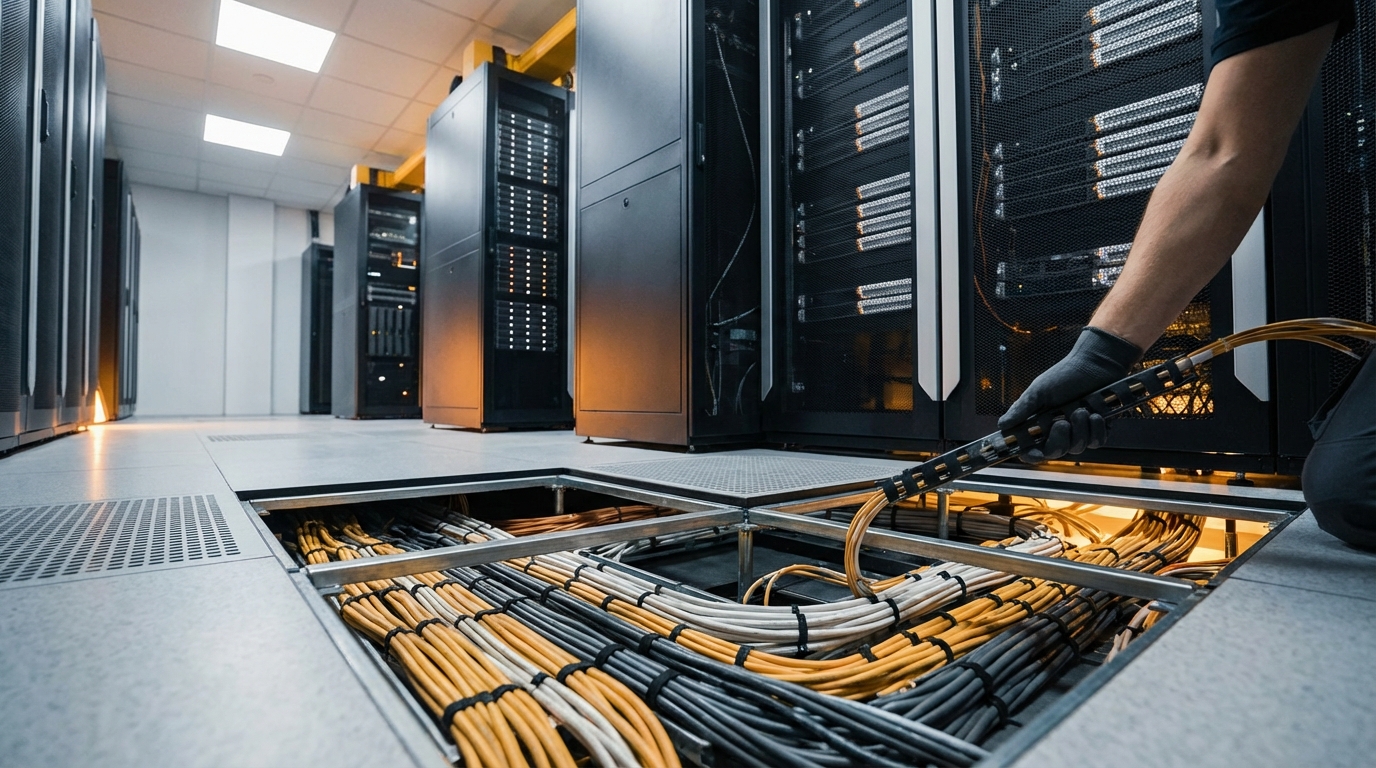
So, you are trying to manage cables in a server room with raised access flooring and connect it all back to the tech choices you are making.
You manage cables in a raised floor server room by planning cable paths, separating power and data, using proper trays and labeling, and designing for cooling and future growth from day one.
You are not just hiding cables under the floor. You are designing a physical layer that affects reliability, cooling, maintenance time, and even how fast your team can respond when something breaks. Good raised floor cable management makes the room easier to work in and safer, and it sets you up to upgrade hardware without ripping everything apart.
Things you need to know:
- Raised floors are not just empty space; treat them as structured cable highways.
- Power and data must be physically separated to reduce interference and heat.
- Cooling, cable density, and airflow all connect; bad cable runs hurt your cooling.
- Labeling, color coding, and clear documentation save hours on every change.
- Design for growth; running “just enough” cable is how you get a mess in 18 months.
- Trays, ladders, and grommets are not extras; they are the backbone of a clean build.
- The raised floor layout should match your rack layout and patch panel strategy.
What raised access flooring really changes in a server room
A lot of people think raised floors are just about cooling. Cold air under the tiles, perforated tiles in front of racks, done.
That is only half the picture. The other half is how you move power and data under that floor so they do not fight each other, choke airflow, or turn into a maze no one wants to touch.
Raised access flooring gives you three big things:
- A hidden space to run power and data cabling.
- A controlled path for cold air distribution.
- A flexible way to expand or rearrange racks and cables later.
If you just toss cables under the tiles, you lose those advantages fast.
Bad underfloor cable layouts are one of the most common reasons raised floor cooling underperforms, even when the CRAC units are sized correctly.
So you are not just installing a floor. You are designing a system: racks, floor, cooling, cable routes, patching, and labeling all need to work together.
Power vs data: separation under the raised floor
Let us start with the basic rule: keep power and data away from each other.
Power cables create electromagnetic fields. Data cables, especially copper Ethernet, can pick up noise from those fields. That can lead to errors, retries, and in worst cases, link drops.
Typical separation approaches
Under a raised floor, you usually see three patterns:
- Power on one side, data on the other
Power whips and feeds run on one side of the room grid. Data runs use the opposite side. - Vertical separation
Power cables close to the slab (floor), data cables closer to the tiles, often each in separate trays. - Dedicated power and data raceways
Metal raceways for power, plastic or dedicated trays for data, each with its own path and rules for crossing.
You will also want physical crossing rules:
- Cross at 90 degrees when power and data have to intersect.
- Avoid running power and data parallel in close contact.
Think of power and data under the floor like opposing traffic on a highway. Keep them in separate lanes. Cross quickly, do not cruise side by side.
Copper vs fiber under the floor
Copper is more sensitive to interference than fiber. Still, both need care.
- Copper (Cat6/Cat6A/Cat7)
- Respect bend radius.
- Avoid tight bundles that trap heat.
- Keep away from high current power whips and PDUs.
- Fiber
- Very sensitive to bending; do not exceed bend radius.
- Use dedicated fiber raceways or trays where possible.
- Protect connectors from dust; underfloor spaces collect debris.
Airflow, cooling, and cable clutter under the floor
If you have a raised floor with underfloor cooling, the space below the tiles is a pressurized plenum that feeds cold air into the cold aisles through perforated tiles.
Every bundle of cable you drop into that space acts like a dam.
Too many cables in the wrong place and you get:
- High pressure near the CRAC units.
- Low pressure at the far end of the room.
- Hot racks at the far end, even with plenty of tonnage on paper.
I have seen rooms with perfectly sized cooling units where only 60 to 70 percent of racks stayed in safe temperature ranges. The problem was not the CRAC. It was cable boulders blocking air under the floor.
How to keep airflow and cables from fighting
Think of the underfloor space as two intertwined systems: air and wiring.
You want:
- Major cable bundles along the perimeter or dedicated corridors, not right under perforated tiles.
- Cable trays that run parallel to cold aisles, not right under them.
- No large “cable nests” near CRAC supply outlets.
Some teams adopt a simple rule:
- “No trunk cables under perforated tiles.”
If a tile has holes in it for air, try not to run thick bundles right under that tile.
You can also use small barriers or ramps to guide air around cable trays when trays must cross airflow paths.
Raised floor height and its impact
Floor height matters more than many people expect.
Here is a simple comparison:
| Raised floor height | What it means for cables | What it means for cooling |
|---|---|---|
| 150 mm (6 in) | Very tight, harder to run trays, limited separation of power/data. | Restricted airflow, very sensitive to cable clutter. |
| 300 mm (12 in) | Enough room for trays, better routing paths, easier adds/changes. | Better static pressure, more tolerance to imperfect cable layouts. |
| 450 mm (18 in) or more | Comfortable for heavy cable volumes, clearer separation, easier maintenance. | More uniform airflow, easier to balance cold air across room. |
If you expect dense server racks, lots of network gear, and frequent change, a taller floor gives you more room to route cables without wrecking airflow.
Planning cable routes under raised floors
You do not want every new rack to turn into “just throw some more cable under there”. That is how you earn a cable graveyard.
You want predefined paths.
Design from top view
Start with a top-down drawing of the room:
- Mark cold aisles and hot aisles.
- Mark CRAC units and underfloor supply points.
- Mark power distribution (PDUs, RPPs, panels).
- Mark network rows and core/aggregation racks.
Now define cable “highways”:
- Trunk paths
Major corridors for large bundles: power feeders, backbone fiber, uplink copper. - Branch paths
Smaller runs that peel off trunks to individual rows and racks.
If you cannot draw your underfloor cable routes with a marker on a floor plan, your team will “improvise” them with actual cable later.
Use trays, ladders, and raceways, not the bare floor
Leaving cable on the slab works in the first week. By month six, it becomes a layered pile that no one wants to touch.
Use:
- Metal cable trays for power (with covers when needed).
- Plastic or metal cable trays/ladder racks for data.
- Dedicated fiber troughs for fiber bundles.
Mount trays to the raised floor pedestals or to the slab, not just resting loose on the floor.
Access points and grommets
Cables need to enter racks through floor openings. If you just cut random tiles, you get air leaks and ragged edges that cut cable jackets.
Use:
- Brush grommets where cables pass from underfloor to the rack.
- Sealed grommets for openings that also carry air pressure.
- Standard tile cut patterns for each rack position so every bay looks and works the same.
This helps cooling because you only let air up where you plan it, through perforated tiles and controlled cutouts, not the gaps around random holes.
Top-of-rack vs end-of-row: how strategy changes the floor
Your network design affects the cable layout under the floor more than people expect.
Two common switches layouts:
- Top-of-rack (ToR): one or more switches inside each rack.
- End-of-row (EoR) or middle-of-row (MoR): switches in a few network racks at the end or middle of each row.
Top-of-rack and raised floors
With ToR:
- Short server-to-switch copper inside each rack.
- Fewer long horizontal copper runs under the floor.
- More fiber or higher-count copper uplinks from each rack to aggregation/core.
That means your underfloor path often carries:
- Bundles of fiber uplinks.
- Power whips to each rack.
Cable volume is still high, but the pattern is more predictable. You can have a simple rule:
- “Each rack position has one power whip tray under it and one fiber trunk route along the row.”
End-of-row and raised floors
With EoR:
- More server-to-switch copper from each rack to the end-of-row cabinet.
- Underfloor copper bundles along the row, often with a lot of pairs.
That leads to thicker copper bundles under the row, which:
- Take more space in trays.
- Block more airflow if not handled carefully.
EoR designs can keep your network gear centralized, but they often push much more copper under the floor. If the trays are not sized correctly, those bundles grow into cable walls.
Simple comparison
| Design | Underfloor data cable profile | Raised floor focus |
|---|---|---|
| Top-of-rack | More fiber trunks, fewer long copper runs. | Good fiber trays, clear paths to core, many smaller bundles. |
| End-of-row | Heavy copper runs along rows, fewer fiber trunks. | Higher tray capacity, more attention to airflow blocking. |
Your choice here directly changes how you plan trays, floor height, and grommets.
Labeling, color coding, and documentation
Cable management is not just physical. It is logical too.
Under a raised floor, you cannot see everything at a glance. You have to rely on:
- Labels.
- Color schemes.
- Accurate diagrams.
Labeling strategy
Every cable should tell you:
- Where it starts.
- Where it ends.
- What type it is.
Typical label patterns:
- Rack-row: Rack number, U height, port identifier.
- Panel-to-panel: Panel ID, port number on each end.
Use heat-shrink or wrap-around labels that resist dust, heat, and occasional cleaning.
If you have to tug on a cable to figure out where it goes, the labeling has already failed.
Color coding
Color coding helps under a floor because you often see only a cross-section of a bundle.
Example scheme:
- Blue: standard data.
- Yellow: management network.
- Green: storage network.
- Red: critical uplinks.
- Black: power cords (if visible in the same area).
Match the same scheme in trays, at patch panels, and at endpoints, so a technician knows what they are holding even before reading the label.
Documentation and diagrams
You need three levels of documentation:
- Floor plan diagrams
Where trays run, where power feeds run, where they cross, and which pedestals carry which supports. - Rack elevation diagrams
Per rack: which U positions have patch panels, PDUs, and cable entry cutouts. - Cable database
A system (even a spreadsheet to start) that tracks each link and both endpoints.
Every time someone adds a cable, the update process should be as normal as closing a ticket.
Practical rules for underfloor cable installation
Now let us get action oriented. If you are standing with a plan and a pile of cable, what rules keep things tidy and reliable?
1. Respect bend radius
Twisting cables too hard harms performance and longevity.
Typical guidelines:
- Copper: bend radius at least 4 times cable diameter.
- Fiber: often 10 times cable diameter (check vendor spec).
Use wide turns in trays, not tight corners. If trays take sharp turns, add radius control fittings.
2. Do not overfill trays
Most tray systems specify a maximum fill, often around 40 to 60 percent of cross-sectional area.
Too full and you get:
- Crushed cables.
- Trapped heat.
- Inflexible bundles that are hard to patch or change.
If you are tempted to “just make it fit” by pressing cables down with a hand, the tray is already too full.
Plan for growth: if you need 50 cables now, design the tray for 100.
3. Bundle with intention, not tape
Avoid tight plastic zip ties. They cut into jackets and pinch pairs.
Use:
- Velcro straps.
- Lighter, spaced bundling points, not continuous wrapping.
Bundle by:
- Destination rack or row.
- Cable purpose (for example: all storage cables together).
That way, when you remove a rack, you can pull a whole bundle without unweaving the entire room.
4. Keep service loops reasonable
A small extra length at each end (a service loop) helps in maintenance. Too much extra length and you create coils that block airflow and look messy.
Good practice:
- Keep loops flat, not stacked vertically.
- Do not place large coils directly under perforated tiles.
- Document where excess slack is stored (rack top, underfloor tray, dedicated slack box).
5. Separate “runways” for different systems
Under the same floor you might have:
- Server/network data.
- Storage network.
- Building systems (BMS, sensors, security).
- Power (critical and non-critical).
Give each a clear path or tray segment. Label the tray itself so a technician knows “this tray is storage fiber” before opening it.
Raised floor vs overhead cabling: a quick comparison
Not every server room uses underfloor for cabling. Some use raised floors mostly for air and run cables overhead.
Here is a quick look at how they compare.
| Aspect | Under raised floor | Overhead |
|---|---|---|
| Access | Requires tile removal; more physical effort. | Requires ladder/lift; sometimes easier near aisles. |
| Airflow impact | Can block underfloor cooling if unmanaged. | Less impact on cooling if aisles are kept clear. |
| Visual clutter | Hidden from view; cleaner look. | Visible trays and bundles overhead. |
| Dust & debris | Underfloor can collect dust, requiring good sealing and cleaning. | Overhead usually stays cleaner. |
| Integration with raised floor | Works well when cooling and cabling are co-designed. | Floor used mostly for air and power; data stays out of plenum. |
In many modern data centers, you see:
- Power under the raised floor.
- Data overhead.
If you already have raised access flooring and want to use it for data cabling, you just need to be more careful about airflow and load.
Safety and compliance under raised floors
Cable management is not just about neatness. It touches safety and codes.
Grounding and bonding
Metal trays, racks, and the raised floor structure often need grounding and bonding, according to local electrical codes and standards.
This reduces:
- Shock risk.
- Noise problems for some data systems.
Connect trays to the building grounding system at defined points, not randomly.
Fire safety and materials
Depending on whether the underfloor space is a plenum (air handling space), you may need plenum-rated cables and specific materials.
For example:
- Plenum-rated (CMP) jackets for copper cable.
- Low-smoke, halogen-free materials in some regions.
Using the wrong cable type in a plenum can violate fire codes and create toxic smoke in a fire, even if everything works fine day-to-day.
Check local regulations and your building’s fire strategy before you pull miles of cable.
Lifecycle: designing for change, not just day one
Server rooms change. Hardware refreshes, new networks, extra storage. Your raised floor cable plan has to handle that.
Capacity planning
When you design cable paths and tray sizes, think in three layers:
- Current load.
- Planned growth (for example: next 2 to 3 years).
- Unplanned margin (for example: 25 to 50 percent extra capacity).
If you design for “exactly what we need right now”, you are forcing yourself into another build-out the moment you grow.
Standardization
Try to keep:
- Standard rack positions and spacing.
- Standard floor tile cutouts for each rack spot.
- Standard tray layouts per row.
When every rack bay has the same underfloor pattern, technicians know where things are without guessing.
Change process
Cabling changes should follow a simple flow:
- Plan: decide route, tray, and entry point.
- Install: follow existing standards for bundling and labeling.
- Update: record in your cable database and floor plan.
If people skip the last step, documentation falls behind and eventually becomes useless. Then everyone goes back to guessing under the floor.
Common mistakes in raised floor cable management
You can learn a lot by avoiding what goes wrong in many server rooms.
1. Treating the floor like a big empty box
When teams think, “We will just drop cables under the tiles”, they:
- Run cables wherever there is space.
- Block airflow paths.
- Mix power and data randomly.
Fix: design specific paths and enforce them.
2. Ignoring cooling while adding cables
A network upgrade can quietly ruin your cooling if you:
- Add new trays right across airflow paths.
- Stack new bundles on top of old ones near perforated tiles.
Fix: every cable project should include a quick airflow check under the floor.
3. Poor labeling
Labels that:
- Fall off.
- Use inconsistent formats.
- Are written in fading marker.
turn every troubleshooting job into tracing cables by hand.
Fix: set a label standard and stick to it, with printed labels and clear formats.
4. Over-reliance on memory
“I know where that tray goes” works fine until that person is on vacation or leaves the company.
Fix: diagrams and notes that live in a shared system, not in anyone’s head.
5. No maintenance under the floor
Underfloor spaces collect:
- Dust.
- Loose screws.
- Dropped cable ties.
Over time, that can:
- Hurt airflow.
- Clog grommets and tiles.
If the space under your raised floor has not been inspected in a year, you probably do not really know what your cooling and cabling look like anymore.
Fix: schedule periodic underfloor inspections and cleanups, even if only for targeted areas.
Linking raised floor decisions to broader tech choices
Physical cable management might feel like a side topic compared to cloud, automation, or network design. It is not.
The way you build under your raised floor touches several bigger tech decisions.
High-density servers and power planning
Modern servers pull more power per rack. That means:
- Thicker power feeds.
- More power whips under the floor.
- Stronger separation needs from data trays.
If you plan to move toward high-density compute, your raised floor cable plan needs room for extra power capacity now. Otherwise you end up with improvised runs later.
Redundancy and dual-path cabling
For A/B power and dual network paths:
- Plan separate underfloor paths for A and B feeds.
- Keep dual fiber routes physically separated, not just logically distinct.
This affects:
- Where you place PDUs and RPPs.
- How you route uplinks from racks to aggregation.
Monitoring and smart infrastructure
If you use environmental sensors, DCIM tools, or cable tracking systems, the underfloor layout should support them:
- Mount temperature and pressure sensors in key underfloor zones.
- Track which trays get close to capacity.
- Connect your floor plan to real-time monitoring views.
Now your physical cable management feeds back into your digital monitoring.
How to start improving an existing raised floor server room
Maybe your room already has a raised floor and a cable mess. You do not have to rebuild from scratch. You can improve in steps.
Step 1: Survey and map
Pick a section of the room and:
- Lift tiles carefully along one row.
- Take pictures of trays, bundles, and crossings.
- Mark power vs data paths on a floor plan.
Look for:
- Blocked airflow near perforated tiles.
- Power and data running side-by-side for long stretches.
- Overfilled trays.
Step 2: Define simple rules
Even a few rules help a lot:
- “Power on the perimeter trays, data in the inner trays.”
- “No new cables in this tray; it is at 70 percent capacity.”
- “Under this cold aisle, no new trunk bundles.”
Post these rules where technicians see them and include them in change templates.
Step 3: Fix the worst choke points first
You do not have to fix everything at once. Start where the risk is highest:
- Areas with hot racks.
- Trays at or beyond capacity.
- Power and data tightly bundled together.
Re-route a few bundles, add a tray segment, or redistribute cables across multiple paths.
Step 4: Integrate into project work
Every time you:
- Add new racks.
- Upgrade network gear.
- Pull new fiber.
include a task to adjust or improve the underfloor layout in that area. Small, continuous cleanups are easier than one giant “fix the entire floor” project.
Treat underfloor cable management like refactoring in software. Do a little improvement with each change, and the system stays healthy over time.
A practical tip you can apply this week
Pick one row in your server room and do a quick underfloor “health check”:
- Lift every second tile along that row.
- Check where data and power share close space.
- Look for any trays that are more than half full on that segment.
- Note any big cable bundles directly under perforated tiles.
Then pick just one improvement to make for that row:
- Either separate power and data more clearly,
- or relieve a single overfilled tray by adding a small parallel tray.
Take photos before and after. Share them with your team and set that as the new standard for the rest of the room.