
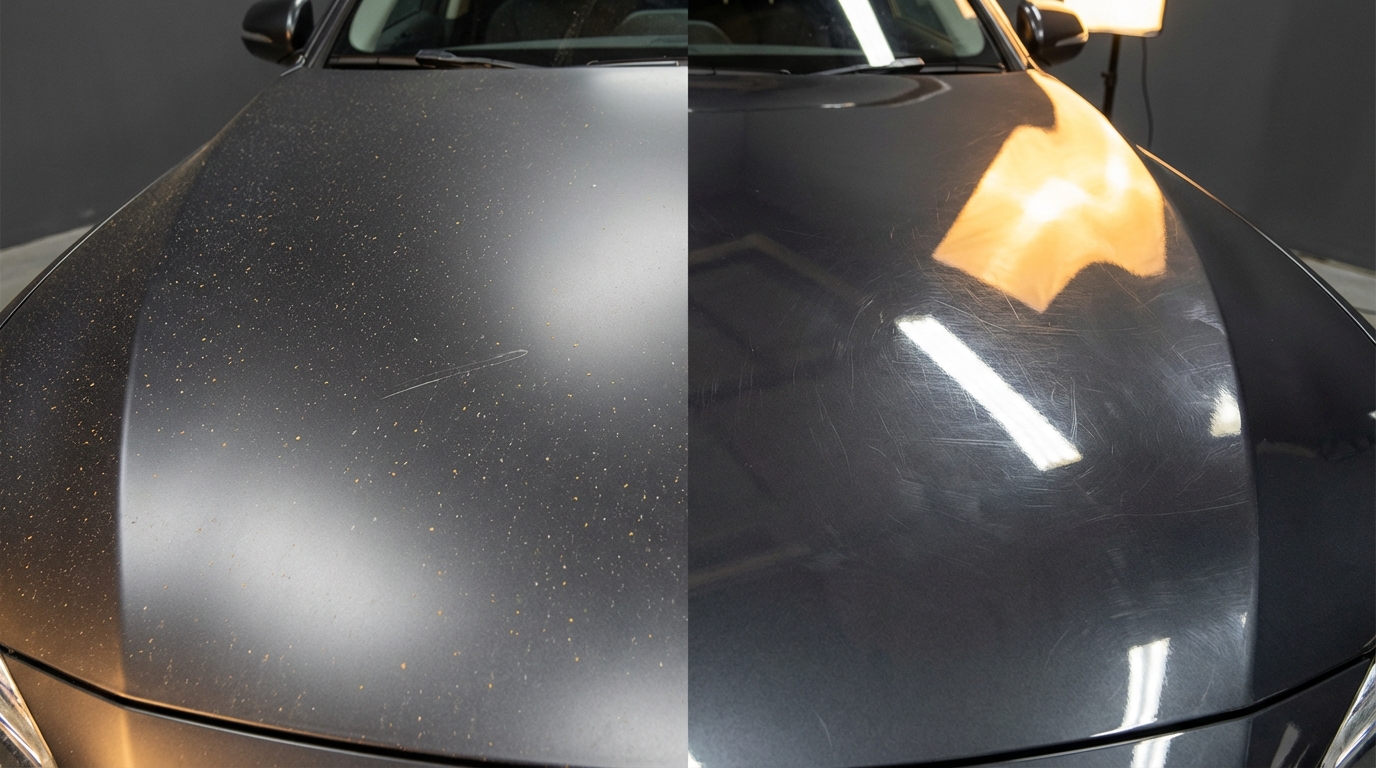
So, you are trying to figure out whether a matte or gloss finish hides scratches and dust better on your tech gear.
Gloss shows more scratches and dust; matte usually hides them better but can show smudges and texture.
You are basically trying to balance three things at once: how your device looks on day one, how it ages with normal use, and how much cleaning you want to do. Finish type affects all three. The same phone, laptop, monitor, or console can look brand new or beat up in six months, just based on whether it is matte or glossy.
Here are the key points upfront.
- Gloss finishes highlight micro-scratches, swirl marks, dust, and fingerprints.
- Matte finishes diffuse reflections, so light damage and dust stand out less.
- Gloss can look “sharper” and more vibrant, which also makes flaws more visible.
- Matte can collect oils and look cloudy or patchy when dirty.
- Hardness of the coating matters more than finish alone for deep scratches.
- Cleaning habits and lighting in your room change what you notice first.
- On screens, matte hides dust and fingerprints, gloss gives better contrast.
- On cases and shells, matte plastic or soft-touch paint hides wear the best.
Now lets walk through when matte makes sense, when gloss makes sense, and where you might regret each one.
> If you hate seeing every tiny scratch and dust particle, matte is usually the safer choice.
> If you care more about pop and clarity than about micro-scratches, gloss wins.
> The worst combo is gloss + soft material + no case. It looks great for a week and tired after a year.
> The best combo for hiding wear is a slightly textured matte surface in a mid-tone color.
> Lighting matters more than people think; the same scratch looks harsh under a spotlight and barely shows near a window.
Matte vs gloss: what actually changes how scratches and dust look
Matte and gloss finishes are not just different looks. They change how light hits the surface and bounces into your eyes. That is why the same scratch can be invisible on one finish and obvious on another.
How gloss behaves with scratches and dust
Gloss finishes act like a mirror. They reflect light in a clear, sharp way. That is why colors look deeper and blacks look darker on gloss screens and shells.
That mirror effect has a side effect. Any small disruption in that surface stands out.
- Micro-scratches: Little swirls from wiping with a t-shirt, or dragging the device on a table, break the smooth reflection and show as bright lines.
- Dust: Dust particles catch light and sit on top of the shiny layer, so you see them right away on black or dark colors.
- Fingerprints: Oils from your hands create smudges that reflect light differently, so you see cloudy patches and streaks.
If you have ever had a black glossy phone back and tried to photograph it, you know this pain. You clean it, set it down, pick it up, and right away you see streaks again.
How matte behaves with scratches and dust
Matte finishes scatter light. Instead of a sharp reflection, you get soft, diffused light. That reduces glare, but it also hides surface defects in many cases.
- Micro-scratches: Because the surface already has a slight texture, fine scratches blend into that texture.
- Dust: Dust is less obvious, especially under softer lighting, because the surface does not act like a mirror.
- Fingerprints: These vary. Traditional matte plastic hides them well. Soft-touch or satin coatings can trap oils and look patchy.
So matte is not magic. It hides some problems and trades them for others. But if your main concern is visual wear from small damage and dust, matte usually wins.
How this plays out on different devices
Lets look at where you actually run into this. Phones, laptops, tablets, monitors, TVs, consoles, peripherals. Each uses finishes a little differently.
Smartphones: backs, frames, and screen protection
Modern phones mix at least three surfaces:
- Front glass (usually glossy, sometimes with a matte screen protector)
- Back glass or plastic (glossy or frosted/matte)
- Metal or plastic frame (often satin or brushed)
Glossy backs
You see glossy backs a lot on mid-range phones and some high-end models that lean on color gradients.
Pros:
- Looks “clean” and bright out of the box.
- Good for showing off strong colors.
Cons:
- Shows fingerprints immediately.
- Hairline scratches around the camera area stand out.
- Dust around the edges and camera bump is very visible, especially on black.
If you do not use a case and drop your phone in pockets or bags, those swirl marks appear fast.
Matte or frosted backs
Think of flagship phones with frosted glass backs or matte plastic mid-range phones.
Pros:
- Fine scratches blend in with the texture.
- Dust does not scream at you, especially on lighter colors.
- Better grip in many cases.
Cons:
- Some frosted glass can still scratch; you just do not see it as clearly.
- Oils can cause “dark spots” over time where your fingers rest.
If you care about hiding wear, a matte back plus a thin clear or matte case is one of the most forgiving setups.
Screens: matte vs gloss (with protectors)
Most phone screens ship as gloss. Anti-reflective coatings help a bit, but they still act like a glossy surface. To go matte, you use a matte screen protector.
How it affects scratches and dust:
- Gloss screen: Micro-scratches from sand or keys show as bright arcs when the screen is off or in strong light. Dust is obvious because it breaks the clean reflection.
- Matte protector: Diffuses small scratches so they are harder to see. Dust is less obvious, but it can “stick” a bit more when you wipe.
Tradeoff: matte protectors soften the image. Text looks a bit less sharp. If your priority is “screen looks perfect in photos and when off”, gloss is better. If your priority is “I do not want to see every hairline scratch”, go matte.
Laptops: shells, keyboards, and screens
Laptops are interesting because you have multiple finishes in one product: the lid, the deck around the keyboard, the trackpad, and the display.
Outer shell (lid and underside)
You usually see three types here:
- Polished glossy plastic or metal
- Matte or satin metal (brushed aluminum, sandblasted, etc.)
- Rubberized or soft-touch plastic
How they handle wear:
| Finish | Scratches | Dust | Fingerprints |
|---|---|---|---|
| Gloss plastic | Scratches show as bright lines, especially on dark colors | Very visible on lid and around logo | Collects smudges fast |
| Matte metal | Fine scratches blend with grain; deeper marks still visible | Less obvious except on black surfaces | Light prints, easy to wipe |
| Soft-touch | Can wear smooth or shiny in high-contact areas | Not very visible | Oils can soak in, causing darker patches |
For hiding normal wear, a matte anodized metal lid is usually the least stressful. That slight texture hides a lot.
Keyboard deck and trackpad
This is where real daily wear shows up.
- Glossy plastic decks show shiny spots where your palms rest and scratches from watches or bracelets.
- Matte decks hide scratches better, but over time you still see a “polished” area from skin contact.
- Gloss trackpads feel smooth but will show micro-scratches and smudges.
- Matte glass trackpads are surprisingly good at hiding small scratches while still looking clean.
If you rest your wrists on the laptop for hours every day, matte beats gloss. Even when the surface wears, it looks like a gradual shine, not harsh scratches.
Displays: matte vs gloss
Laptop displays are where the debate gets strong. Many creative pros like gloss for color and contrast. Many coders and office users prefer matte for comfort.
For scratches and dust:
- Gloss laptop screens show faint scratches if you press on them or tap with objects. Dust shows clearly, especially when the screen is off.
- Matte screens hide dust a little and hide micro-scratches better. You still do not want to press on them though.
One detail: some “matte” coatings are very fine, almost satin. They keep text crisp but still help with glare and small defects. If you are buying a laptop mainly for coding or writing, this is a good sweet spot.
Monitors and TVs
For large screens, finish affects both comfort and how many times you reach for a microfiber cloth.
Glossy TVs
Glossy screens give deep blacks and high contrast. In dark rooms, they look great. In bright rooms with windows and lights, they reflect everything.
With scratches and dust:
- Any scratch, even a faint one, can catch light and pull your eye away during dark scenes.
- Dust is very visible when the screen is off or on a bright background.
People often clean TV screens with harsh cloths or paper towels, which can cause those fine swirl marks you see under a flashlight.
Matte or semi-gloss monitors
Most computer monitors lean matte or semi-gloss to cut glare.
- Matte hides dust better, so your screen does not look filthy by noon.
- Micro-scratches from bad cleaning are less obvious.
If you work long hours at a screen, a matte or light anti-glare finish is easier on your mind. You do not feel like every bit of dust is shouting at you.
Consoles and set-top boxes
Think of gaming consoles, routers, and streaming boxes. Many of them mix matte and gloss on one case. That contrast looks nice in product shots, but it is not ideal for hiding wear.
Typical patterns:
- Glossy accent strips or top panels that show dust and scratches.
- Matte main body that looks fine for years.
If you are placing a console on an open shelf, a gloss top will gather dust that you see from across the room. A matte top will still get dusty, but you notice it less unless you are up close.
Peripherals: mice, keyboards, and controllers
These are high-contact items. Your skin oils, sweat, and friction from constant movement create wear quickly.
Mice
- Gloss mice: Look slick at first, then show fingerprints and little scratches on the buttons and sides.
- Matte or textured mice: Hide small scratches and dust but can get shiny “tracks” where your fingers rest.
If you game or work for hours daily, a textured matte finish on the sides with a satin top is a good balance. It hides wear and still wipes clean.
Keyboards
Keycaps come in glossy, matte, or textured finishes.
- Gloss keycaps: Show scratches and shine streaks fast.
- Matte keycaps: Hide light scratches but will develop shine on your most-used keys (WASD, space, etc.).
If you care about your keyboard looking even over time, higher quality plastic with a light texture (PBT, for example) keeps shine and scratches less obvious.
Controllers
Console controllers often use matte plastic on the grips and gloss on accents.
- Gloss center plates scratch and swirl from rings, nails, and storage.
- Matte grips hide most daily wear and do not show dust unless very dirty.
If you can choose, a controller with fully matte shells and subtle texture will look fresher after long use.
How color and finish interact with scratches and dust
Finish is one part. Color is the other. Same finish, different color, very different look over time.
Dark gloss vs light gloss
- Black / dark gloss: Shows dust, micro-scratches, and fingerprints strongly. Every bit of lint stands out.
- White / light gloss: Hides dust very well but can show stains or yellowing with age.
If you still want gloss but care about hiding wear, lighter colors are kinder.
Dark matte vs light matte
- Dark matte: Hides small scratches but shows oils from skin as darker patches.
- Light matte: Great at hiding dust and prints but can pick up visible marks from pens, food, or dirt.
A mid-tone matte (gray, blue-gray, muted green) often gives the best balance: scratches and dust do not jump out, and stains are less obvious.
Material hardness vs finish: when a scratch really matters
Finish is only on the surface. Underneath there is glass, plastic, or metal. Their hardness affects whether scratches happen easily.
Why hardness matters
Hard surfaces resist deep scratches. Soft surfaces pick them up fast.
Approximate hardness context (not lab values, just for feel):
| Material | Relative scratch resistance |
|---|---|
| Tempered glass (screen) | High for normal use, can still scratch from sand or metal |
| Aluminum shell | Moderate; dings and gouges from hard hits |
| ABS plastic (many cases) | Moderate to low; picks up scuffs |
| Soft-touch coatings | Low; can wear off, peel, or scratch easily |
A matte finish on very soft material can still look bad if it chips or peels. A gloss finish on hardened glass holds up well but shows the rare scratch more.
So, when you compare matte vs gloss, ask:
- What is underneath this finish: glass, metal, or soft plastic?
- Is the coating thick enough to resist wear, or just a thin paint layer?
A gloss glass back on a phone will hold up better than a gloss plastic back in many cases, even though both are shiny.
Everyday scenarios: which finish hides what
Lets go through a few practical use cases you probably deal with.
Scenario 1: You work at a dusty desk with pets
Devices: Monitor, laptop, maybe a console under the TV.
What you see daily:
- Hair and dust collecting on any flat surface.
- Fingerprints on screens and trackpads.
Better choice:
- Matte or semi-matte monitor: Dust is not screaming at you; small scratches are hidden.
- Matte laptop shell: Pet hair still gathers, but you see it less.
- Matte console top: Looks “fine” most of the time, even if you skip cleaning for a bit.
Gloss in this case will have you cleaning often just because you notice the dust more.
Scenario 2: You baby your devices and keep a cleaning kit nearby
Devices: Flagship phone, gaming laptop, large 4K TV.
Habits:
- Use microfiber cloths correctly.
- Store devices in sleeves or on stands.
You can probably live with gloss where it helps image quality, like on a TV or main monitor. But keep in mind:
- Over years, even gentle cleaning can add micro-scratches to gloss.
- Matte areas will age visually slower even if they do collect some oils.
If your goal is “looks impressive on a stand”, gloss is fine. Just be strict about how you clean it.
Scenario 3: Shared devices in a family or office
Devices: Office monitors, shared tablets, lobby screens.
These usually see rougher use and less careful cleaning.
Here, matte wins in most places:
- Matte or semi-matte screens hide fingerprints and dust from many users.
- Matte shells hide scuffs from being moved, stacked, or grabbed.
You will still want to train people not to use paper towels on displays, but you get a lot more forgiveness with matte.
Cleaning: how your habits change what finish works best
Even a finish that hides scratches will look bad if you clean it in a way that creates damage.
What scratches gloss fast
- Paper towels or napkins on glossy screens and shells.
- Dry wiping dust off a glossy surface without any spray or moisture.
- Using old T-shirts with sand or grit trapped in the fabric.
Your eyes might not notice every micro-scratch at first, but they accumulate. One day you tilt the device under a lamp and see a field of swirls.
Better cleaning patterns for both finishes
- Use a clean microfiber cloth.
- For screens, use a proper screen cleaner or a slightly dampened cloth, then dry with a second cloth.
- Wipe gently in one direction, not aggressive circles.
For matte surfaces, do not scrub too hard in one spot. Some coatings can polish to a shiny patch if you add pressure often.
When matte is the better pick
Here are cases where matte usually lines up with what you want.
- You are sensitive to small scratches and dust, and they bother you visually.
- You use devices without cases or skins and carry them everywhere.
- Your workspace gets a lot of ambient light and dust.
- You share devices with people who are not careful about cleaning.
Good matte choices:
- Matte or semi-matte laptop displays.
- Frosted glass or matte plastic phone backs.
- Textured matte mice, controllers, and keyboards.
- Matte or satin consoles and routers.
Just remember: matte hides small flaws, but a deep scratch or chip still shows. So cases, sleeves, and careful placement still matter.
When gloss is worth the tradeoff
Gloss is not “bad”. It just demands more care and tolerance for visible wear.
Situations where gloss is reasonable:
- You want the best contrast and clarity from TVs or certain monitors.
- You do a lot of photo or video work and prefer glossy displays.
- You keep devices in controlled environments, not in bags with keys.
- You are fine with cleaning more often and seeing some micro-scratches.
You can reduce the downside of gloss with:
- Good cases or skins on phones and tablets.
- Screen protectors on gloss glass surfaces; you can replace those if they scratch.
- Stands and mounts for TVs and monitors to avoid contact with other objects.
Quick comparison: hiding scratches and dust
Here is a straight side-by-side view.
| Aspect | Matte finish | Gloss finish |
|---|---|---|
| Micro-scratch visibility | Low to medium (often blends in) | High (lines and swirls stand out) |
| Dust visibility | Low to medium, depends on color | Medium to high, especially on dark colors |
| Fingerprint visibility | Low to medium, can show as cloudy patches | High, especially on phones and tablets |
| Perceived sharpness / clarity | Lower, some diffusion of light | Higher, stronger contrast and pop |
| Cleaning frequency (psychological) | Lower, you notice dirt less | Higher, visible smudges bug many users |
How to choose finish per device type
If you are picking new gear or a new accessory, use this as a simple guide.
Phones
- If you go caseless: Prefer matte or frosted backs, lighter or mid-tone colors.
- If you use a case: Finish under the case matters less; focus on case finish (matte TPU or textured hard shell hides wear).
- Screen: If scratches bother you, use a matte or anti-glare protector. If clarity is top priority, use a high-quality gloss protector and accept that you might swap it later.
Laptops
- For travel and commutes: Matte or satin shells with a sleeve. A matte display cuts both glare and the look of dust.
- For desk-only setups: You can live with gloss elements, but still lean matte for decks and trackpads to hide wear.
Monitors and TVs
- Bright rooms: Matte or semi-matte monitor. For TVs, consider semi-gloss with a good anti-reflection layer.
- Dark rooms / home theater: Gloss TV is fine if you are ready to clean it gently and accept visible micro-scratches over many years.
Consoles and peripherals
- Always on display shelves: Matte cases and matte / textured controllers keep things looking tidy.
- Desk setups: Choose mice and keyboards with textured or matte surfaces where your hands rest the most.
One practical tip you can apply today
Pick the one device you touch the most every day (phone, mouse, keyboard, or laptop trackpad), and switch its contact surface to matte first.
That might mean a matte case for your phone, a matte skin on your laptop deck, or a textured mouse. Live with that for a week, and pay attention to how often you think about scratches and dust. If your brain relaxes a bit and you are cleaning less, that is your signal that more matte surfaces across your setup will suit you better.